Web scraping with an AI agent: API, MCP, extraction or a browser?
A 50-product Blinkit search, a page extraction and an MCP call, run on 23 September 2026 and measured. What each one returned, what it cost, and which tasks still need a browser.
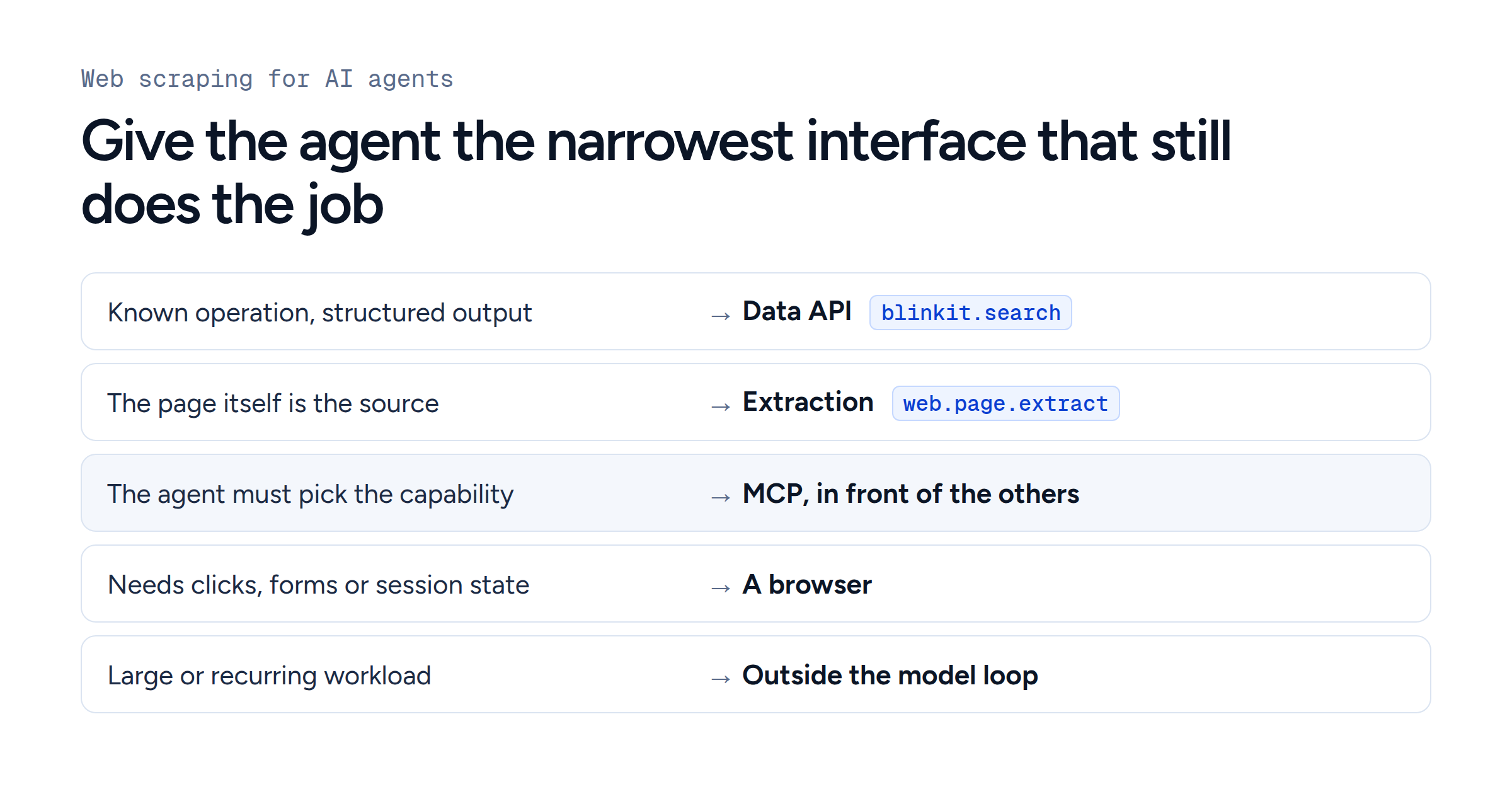
For web scraping with an AI agent, use a structured data API when the operation is known, page extraction when a page is the source, MCP when the agent chooses among capabilities, and a browser only for clicks, forms or a signed-in session.
We ran the first three on 23 September 2026: a 50-product Blinkit search cost 5 credits and a page extraction 1 credit. The example is one request: which protein bars can be delivered to pincode 560102 right now? A person would open the grocery app, set the address, search and scroll. The agent needs what that sequence produces (a location, a query, the matching products, their prices and stock), and a structured API returns exactly that.
Two decisions hide inside "API, MCP or browser?"
The question mixes two choices. One is how the data is collected: the platform's own API, a structured data API, a page extractor or a browser. The other is how the AI application reaches that capability: your code calls it, the model calls it as a function tool, or the agent discovers it through MCP.
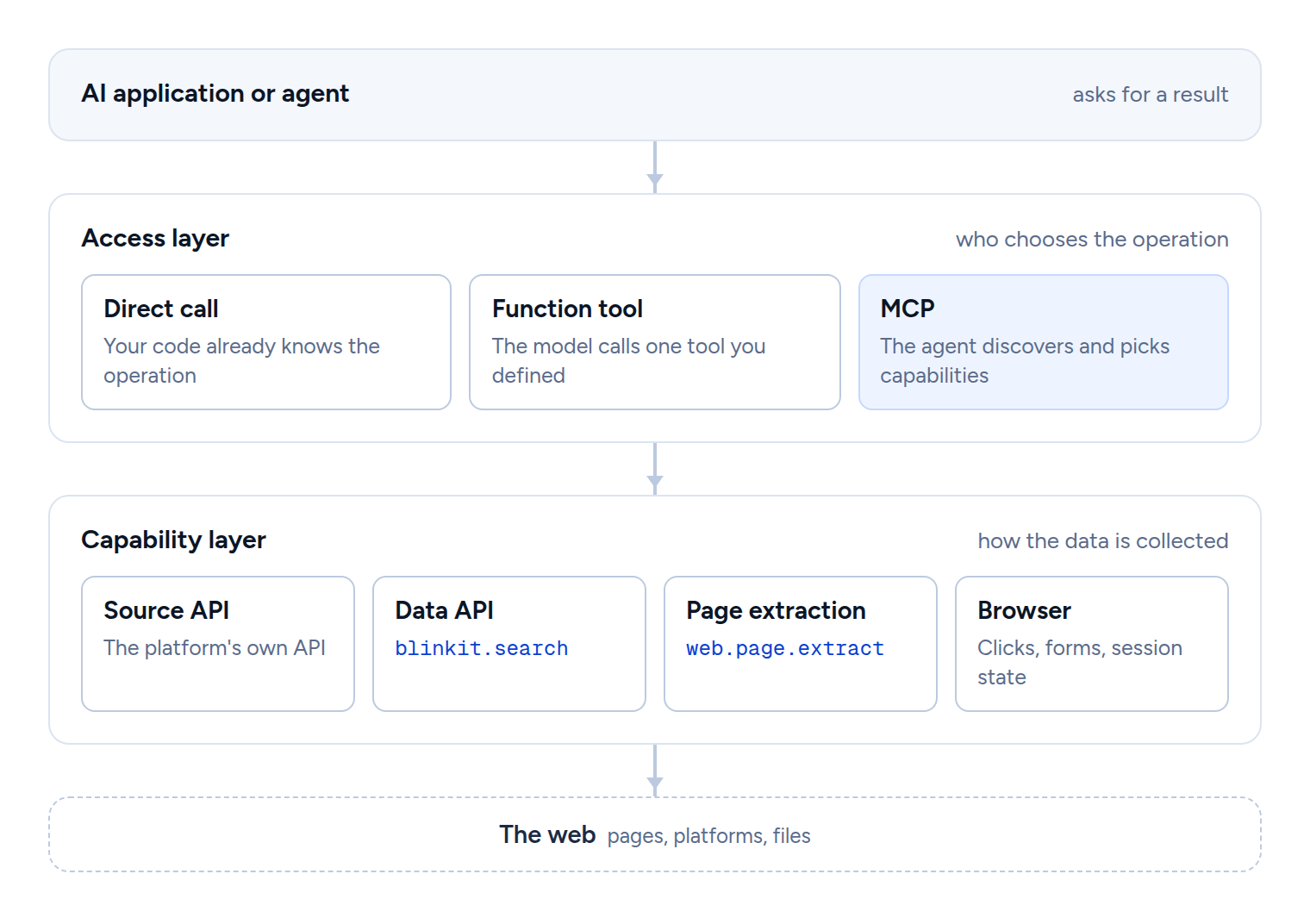
The Model Context Protocol architecture overview places MCP in the second layer: a protocol for exchanging context between AI applications and servers, whose tools can perform "file operations, API calls, database queries". One MCP tool can call a data API and another can drive a browser, and the same data API can be offered over REST and MCP at once.
Use a structured data API when the operation is known
If your application always runs the same search, code can supply the query and location, validate the response, retry known failures and store the result. The model only sees the records it needs. A platform's own API is the first choice when it has the data; many sources have none, or leave out location-specific stock, ranking or promotions. A data API (a scraping API) covers that gap behind a structured request:
curl --request POST \
  --url https://data.upscrape.com/execute \
  --header "Authorization: Bearer $UPSCRAPE_API_KEY" \
  --header "Content-Type: application/json" \
  --header "Prefer: wait=30" \
  --header "Idempotency-Key: protein-bar-560102-run-1" \
  --data '{
    "capability": "blinkit.search",
    "input": {
      "query": "protein bar",
      "pincode": "560102",
      "limit": 50,
      "max_pages": 5
    },
    "max_credits": 5
  }'
A 200 response is a finished job. If the search takes longer than the 30 seconds the call waits, the response is 202 with a job_id: poll GET /jobs/{id} until state is completed or failed, and reuse the same Idempotency-Key if you resend the request.
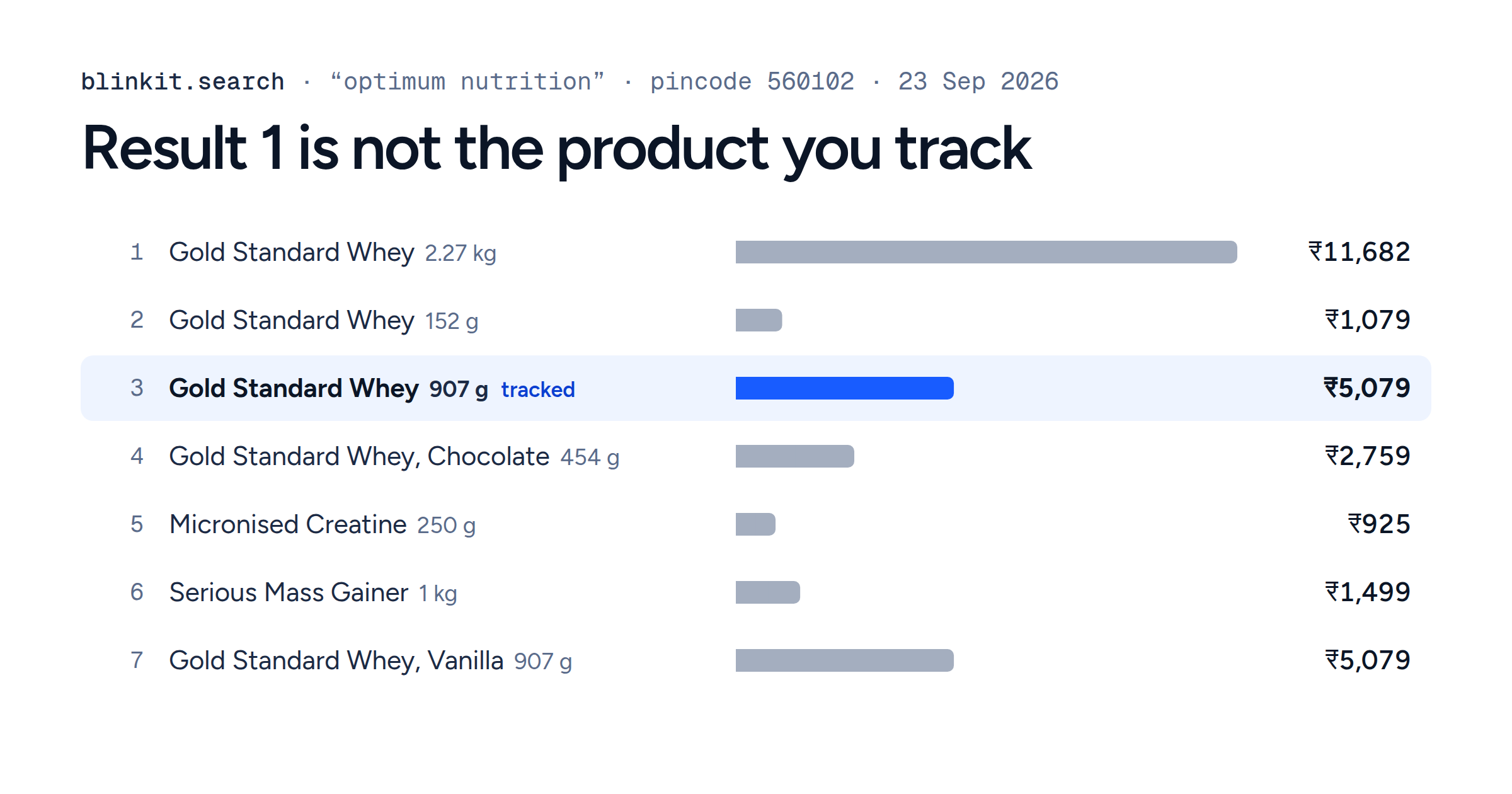
On 23 September 2026 this request returned 50 products, each with its brand, name, pack size, price, MRP, inventory, serving merchant and position. At the price published on 24 September 2026 it costs 5 credits: Blinkit search is charged 1 credit per 12 products requested, shown on the blinkit.search reference as 1 to 9 credits. max_credits makes the request fail before it spends more. The provider handles access, rendering, retries and parsing, and the reference notes that the raw output follows the upstream source.
Run for 500 query and pincode pairs every morning, this is a scheduled job with no model in the loop; the Blinkit price-tracker guide builds it in Python.
Use MCP when the agent chooses the capability
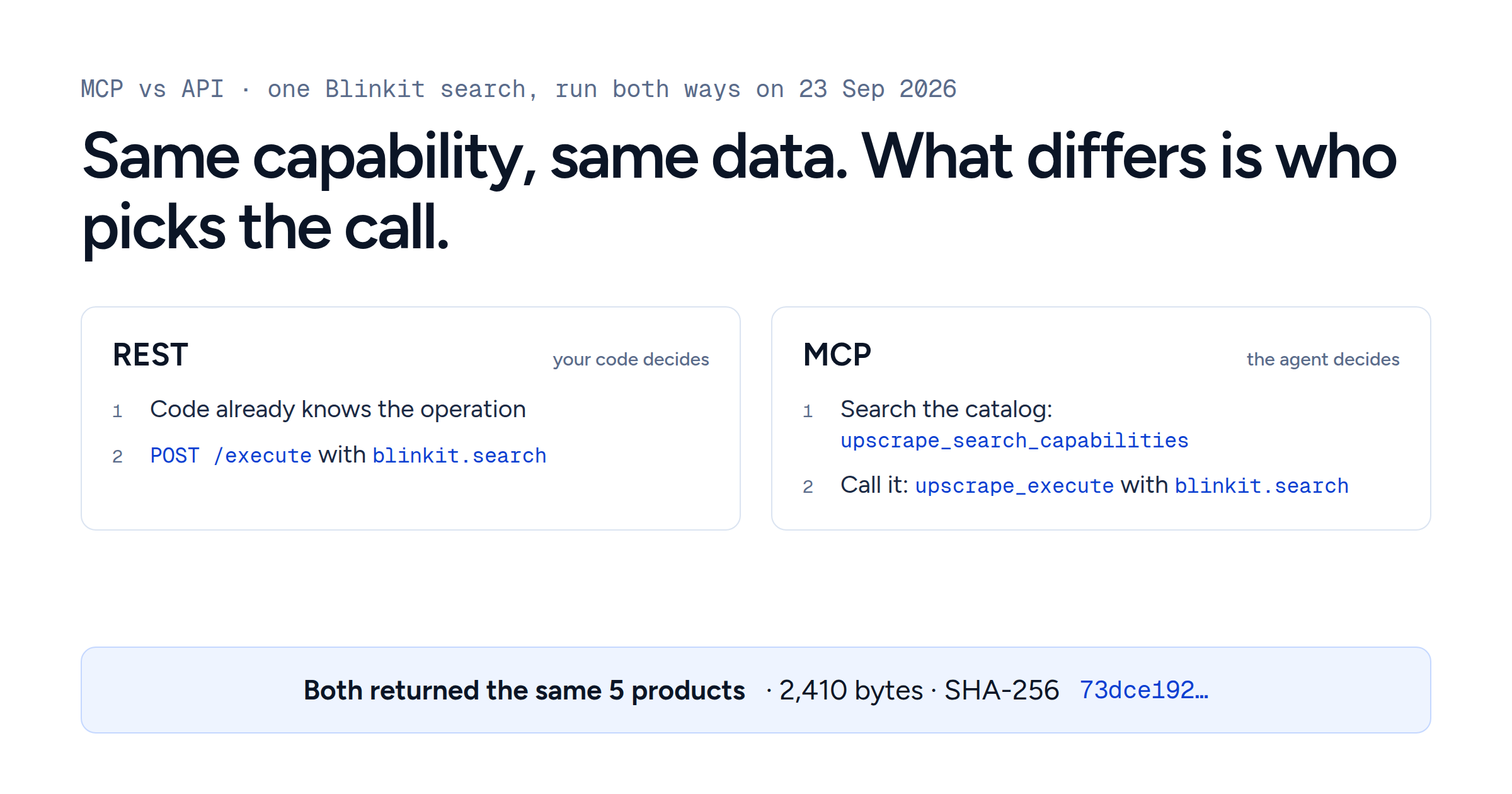
"Compare protein bar options for this area, and use other sources if you need more context" does not name an operation. MCP lets an agent list a server's tools (tools/list), read their names, descriptions and input schemas, and call one (tools/call). Upscrape's MCP server has four tools by default (search the catalog, describe a capability, execute, fetch a result) over the same catalog, execution, credit cost and provenance as REST. The same search as an agent's call:
{
  "name": "upscrape_execute",
  "arguments": {
    "capability": "blinkit.search",
    "input": {
      "query": "protein bar",
      "pincode": "560102",
      "limit": 50,
      "max_pages": 5
    },
    "max_credits": 5,
    "collection_path": "/results",
    "fields": ["/rank", "/product_id", "/brand", "/name", "/variant",
               "/price", "/mrp", "/inventory", "/merchant_id", "/merchant_type"]
  }
}
Capability, input and cost match the REST call. collection_path and fields are MCP arguments that trim what reaches the model; over REST your code does the trimming. The difference is who picked blinkit.search. MCP vs API for AI agents runs one search both ways and covers discovery, retries and permissions.
Use page extraction when a page is the source
A research agent that finds a press release, an investor page or a regulatory notice needs the page's text, tables or a few fields. Generic extraction takes a URL and the shape of the data and returns it. Upscrape's web.extract takes a public URL plus a JSON Schema or plain-language field descriptions, can fall back to a browser, and costs 1 credit. On 23 September 2026 we pointed it at the MCP architecture page cited above:
{
  "capability": "web.extract",
  "input": {
    "url": "https://modelcontextprotocol.io/docs/learn/architecture",
    "fields": {
      "title": "the page's main heading",
      "server_primitives": "the core primitives that MCP servers can expose"
    },
    "allow_browser_fallback": true
  }
}| What came back | Value |
|---|---|
title
|
Architecture overview, from the page's JSON-LD and its h1
|
server_primitives
| Tools, Resources, Prompts, from the sentence that lists them |
| HTML read to get there | 714,779 bytes, about 28,000 characters of text |
| How the page was captured |
Plain HTTP (capture_backend: http)
|
| Rendered in a browser |
No (rendered: false), although the fallback was allowed
|
The agent got two fields and their evidence from 700 KB of markup, and the service skipped the browser it was allowed to use. A page that runs JavaScript can still be handled this way; the service renders it when it has to.
Use a browser when the interface is the task
"Using my signed-in session and saved address, apply these filters, add the chosen pack to the cart and show me the checkout screen before I pay" depends on a session, stored state and a multi-step flow with no lower-level equivalent. That is where browser automation, or computer use, belongs. OpenAI's computer use guide describes it as letting a model "operate browser and desktop interfaces" to "fill out forms, test user flows, or complete tasks in applications through their UI", and says to keep the session alive between calls because later actions depend on earlier state.
It brings more steps and more to watch: screenshots, action traces, time limits, recovery from unexpected dialogs, and a check before anything consequential.
A decision model for web scraping with an AI agent
| If the task looks like this | Start with | Who usually picks the operation | Main concern | Upscrape example |
|---|---|---|---|---|
| The operation and its output are already known | The platform's own API, or a maintained data API, called from your code | Application code | Coverage and the source's terms; for a data API, upstream changes and the provider's contract |
blinkit.search over REST
|
| The useful object is a page or document | Page extraction, before giving a model control of the page | Application or agent | Page variety and extraction quality |
web.extract
|
| Choosing the right capability is part of the agent's reasoning | MCP as the agent-facing layer, in front of any of the others | The agent and its host | Tool choice, permissions, context | The four Upscrape MCP tools over the same catalog |
| It depends on sign-in, clicks, forms, multi-step UI or visual confirmation | Browser automation, isolated and with confirmations | Code or the model | More state, more steps, more ways to fail | Outside Upscrape: a computer-use or browser tool |
| It is large or recurring | Execution, storage and processing outside the model loop | Application code | Scheduling, retries, storage | Scheduled REST calls with results in your database |
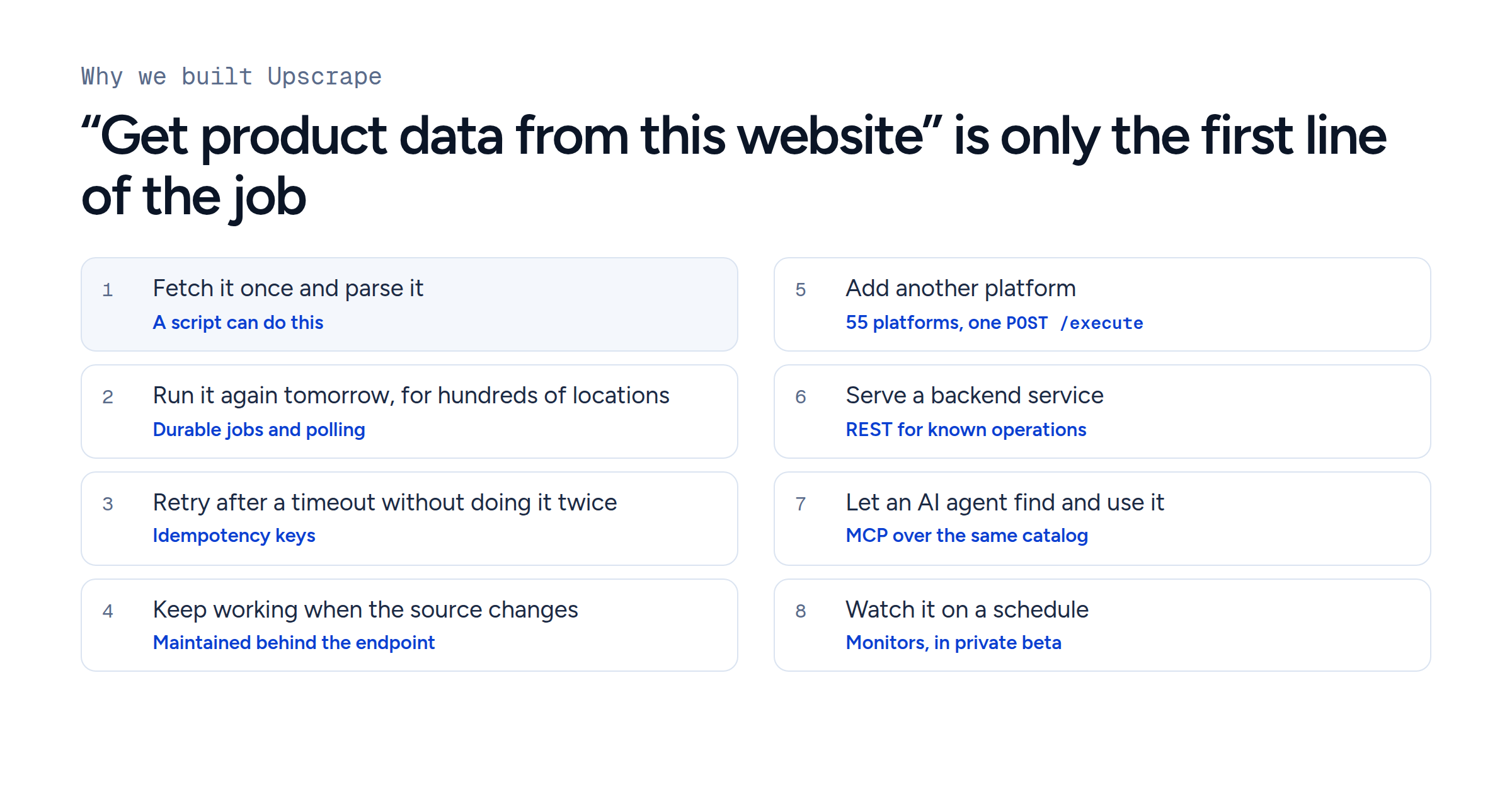
Production systems mix them. A research agent searches for sources, extracts the pages it finds, calls a structured API where one exists and uses a browser for the few sources that need interaction, while recurring collection runs as scheduled jobs the agent can start and check. Each operation the application already knows is one less choice the model can get wrong.
Keep bulk data out of the model's context
The data layer should fetch, filter, deduplicate and store records; the model should get what the current decision needs. For one question about the search above, "which brands appear, and is Nature Valley one of them?", this is how much each form of the result weighs:
- Full result 50 products, up to 15 fields each 23,346
- Five fields per product rank, brand, name, pack size, price 5,796
- The answer result count, brand counts, and whether Nature Valley appears 222 About 1% of the full result
The full result is 23,346 bytes, and 8,252 of them are image and product URLs the question never uses. Nature Valley was not among the 50 results.
Source: Upscrape blinkit.search, query “protein bar”, pincode 560102, 23 September 2026. Sizes are compact JSON bytes of the verified result.
Anthropic's programmatic tool calling lets Claude call tools from code "rather than requiring round trips through the model for each tool invocation", which "decreases token consumption by allowing Claude to filter or process data before it reaches the model's context window". On the data side, upscrape_execute takes collection_path and fields, as in the MCP call above. Recurring collection still needs a database, a queue or a scheduler, whichever way the agent reaches the first capability.
Security follows the same boundary
Web content is untrusted input, whether it comes through an extractor, an MCP tool, a search result or a browser. An instruction hidden in a page must not widen the agent's permissions, approve a purchase, reveal credentials or change what the user asked for.
OpenAI's computer use guide recommends an isolated browser or VM "and an allow list of sites and actions", says "text in a page, document, or tool result cannot grant permission or override the user's instructions", and asks for confirmation before purchases and destructive changes. Upscrape marks MCP tool results with provenance that says the content is untrusted data. A read-only product search leaves far fewer actions to secure than an open browser session, so grant each agent the capabilities its task uses and no more.