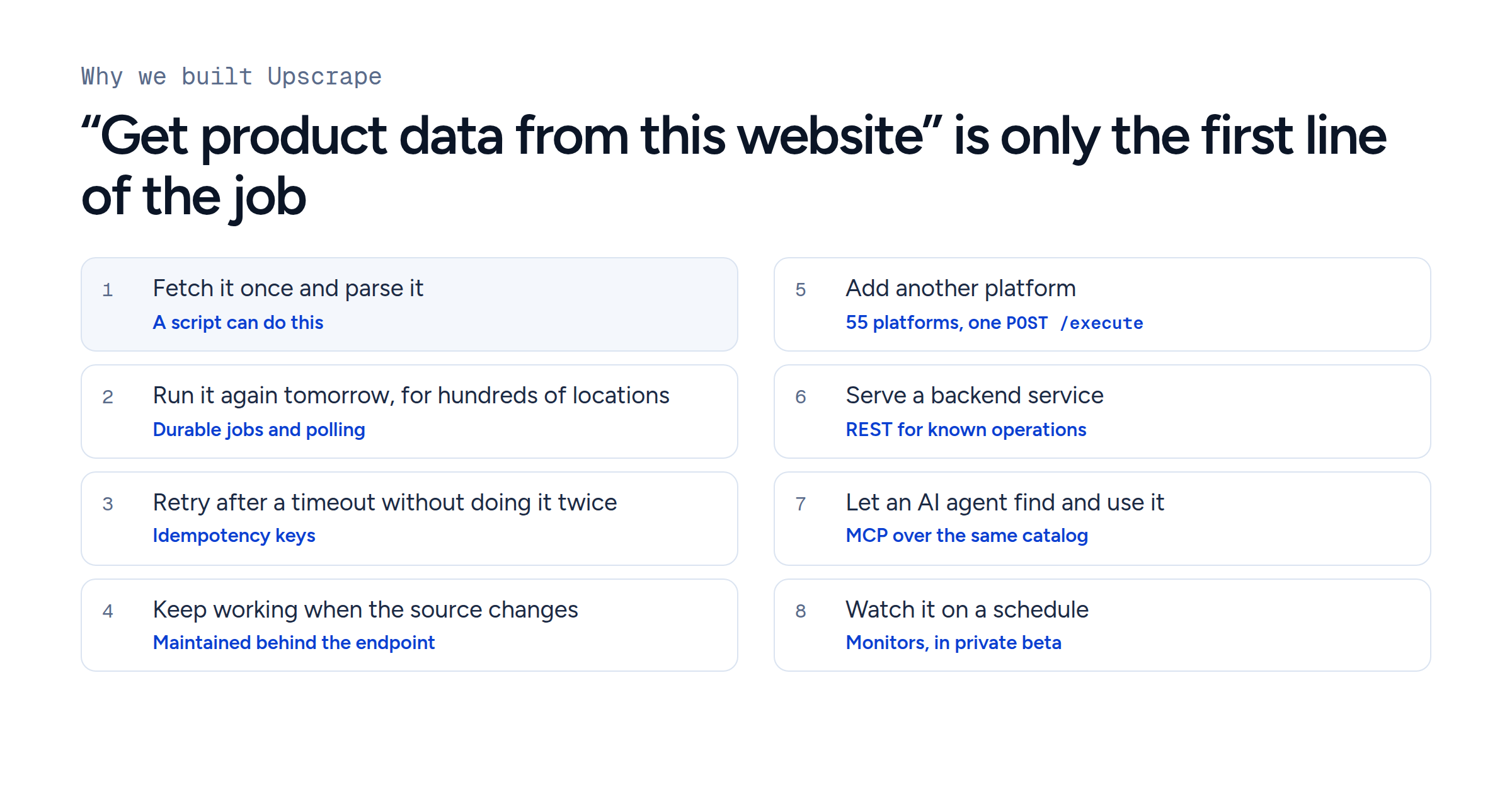
MCP vs API for AI agents: when to use REST, MCP or both
For developers connecting apps and AI agents to live data: when to call a REST API, when to let a model pick tools over MCP, and what we measured running one Blinkit search both ways.
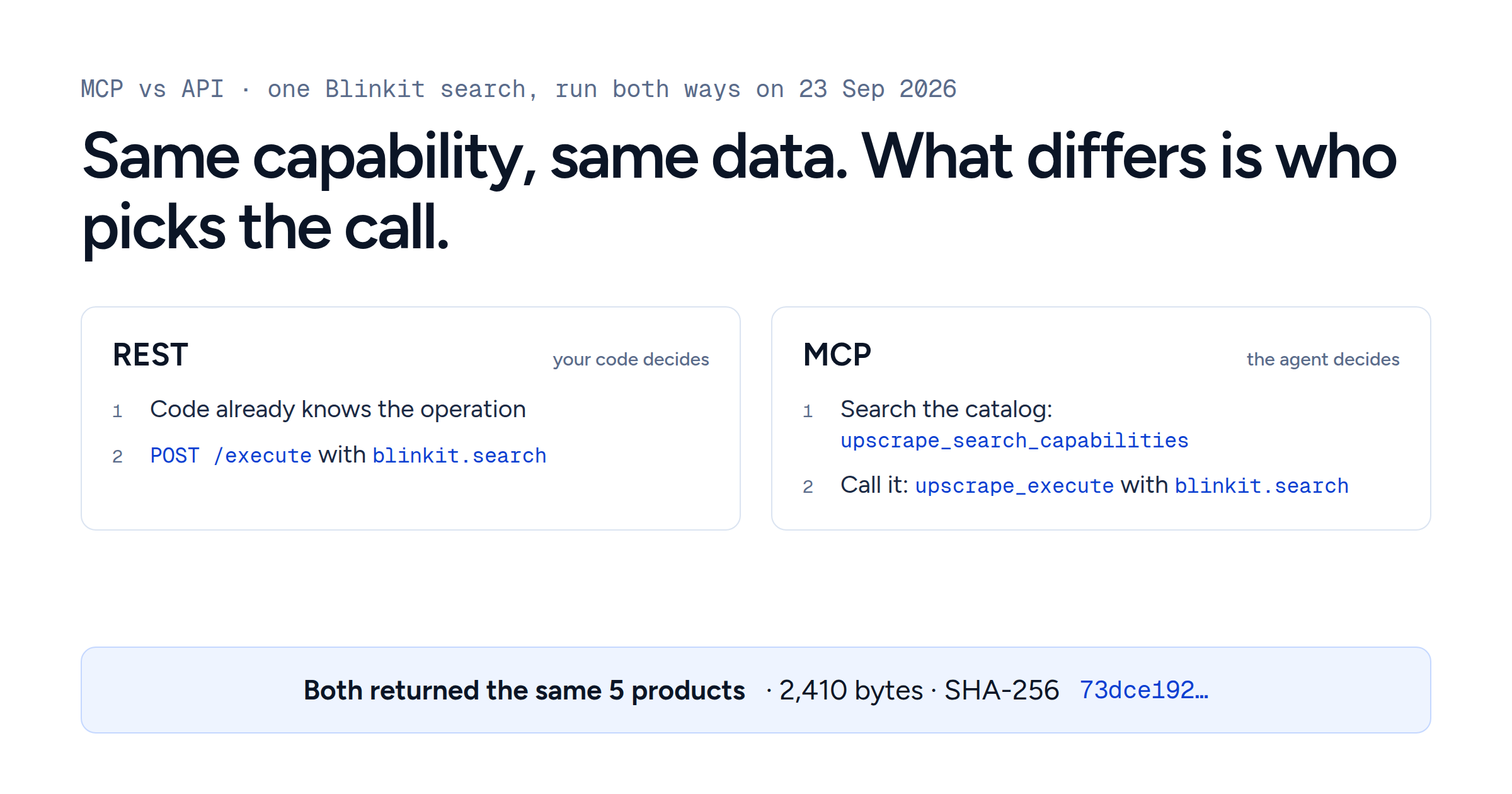
Use a REST API when your code already knows which call to make. Use MCP when an AI model has to find and choose the call itself.
On 23 September 2026 we ran the same Blinkit product search both ways. Both runs returned the same five products at pincode 560102, byte for byte, for 1 credit each. Two things differed: who picked the call, and the envelope around the result. This guide shows both runs, the discovery step that MCP adds, and how to decide.
In "MCP vs API", API is the broad term. For someone building an agent, the choice is between a REST API that your code calls and tools that a model picks over the Model Context Protocol (MCP), an open standard for connecting AI applications to tools. Many systems use both.
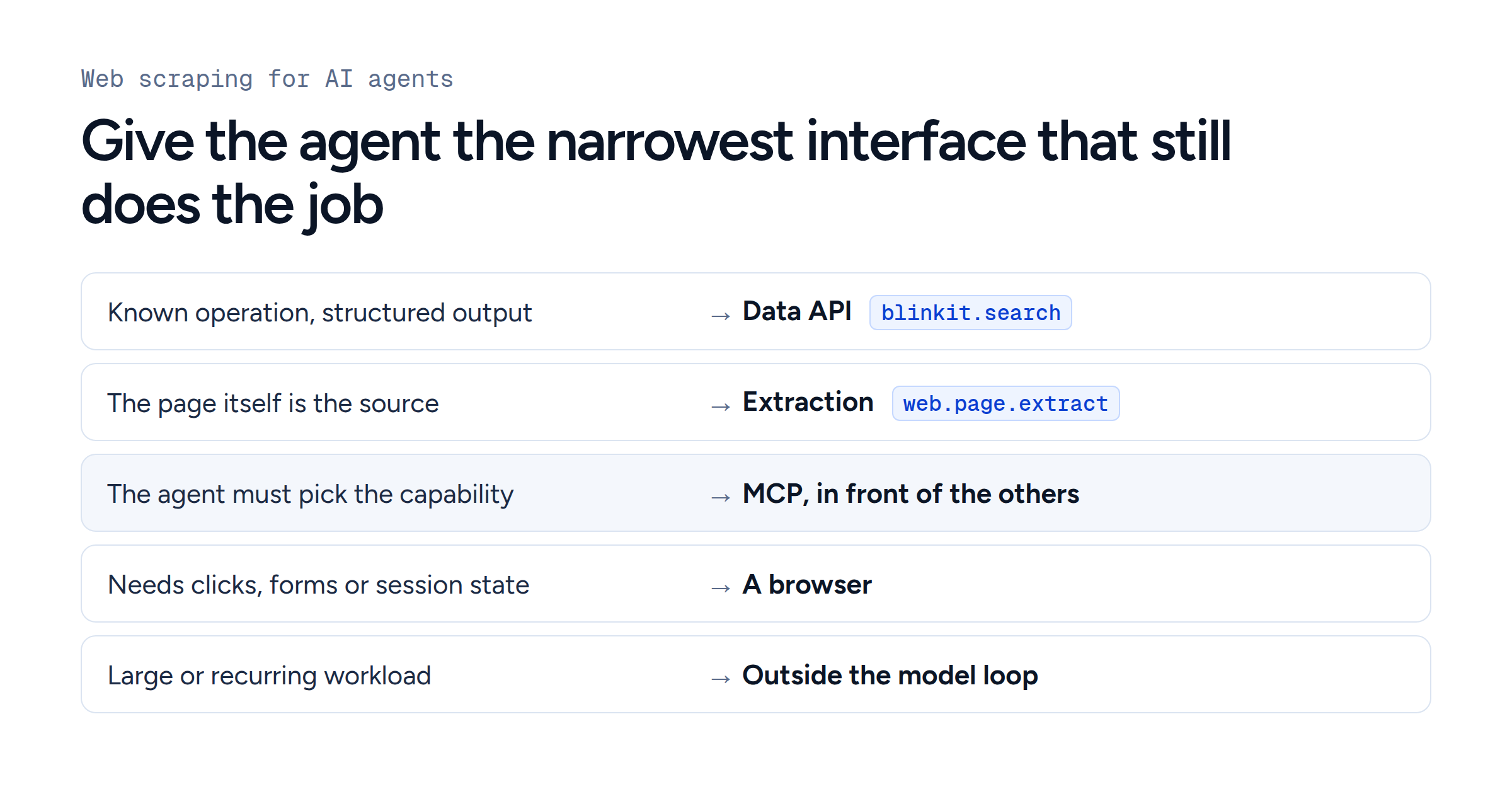
MCP vs API: which to use
| Your situation | Use | Why |
|---|---|---|
| Your code knows the operation and its inputs: a search box, a scheduled job | REST API | One known request, which you can test without a model |
| A model has to choose among many capabilities for an open-ended request | MCP | The model can list the tools, read their inputs and call one |
| One application with a few stable tools, chosen by the model | Function calling backed by REST | The model chooses, with no extra protocol to run |
| The same tools in several AI apps and editors | MCP | One server can serve every MCP-compatible client |
What MCP adds on top of an API
For tools, MCP standardises two things: how an AI application lists the tools a server offers, and how it calls one. A client sends tools/list and gets back each tool's name, description and JSON Schema inputSchema, sometimes with an outputSchema. It then sends tools/call with the chosen tool and its arguments (MCP tools specification).
Every call involves four parts:
The model proposes a tool and its arguments.
The host, the chat app or agent runtime, decides whether the call may run.
An MCP client inside the host sends it to an MCP server.
The server does the work, or calls the service that does.
REST APIs have machine-readable contracts too: OpenAPI describes operations, parameters and responses. The practical difference is who reads the contract and decides. With REST, a developer reads it when writing the code. With MCP, the model reads it at run time.
Conversation memory stays in the host. The current MCP specification is stateless: each request carries everything the server needs.
An MCP server is an interface, so the data is only as good as the service behind it. Upscrape's REST and MCP interfaces share one catalog and execution layer, so both reach the same capability, input schema, job system and credit price.
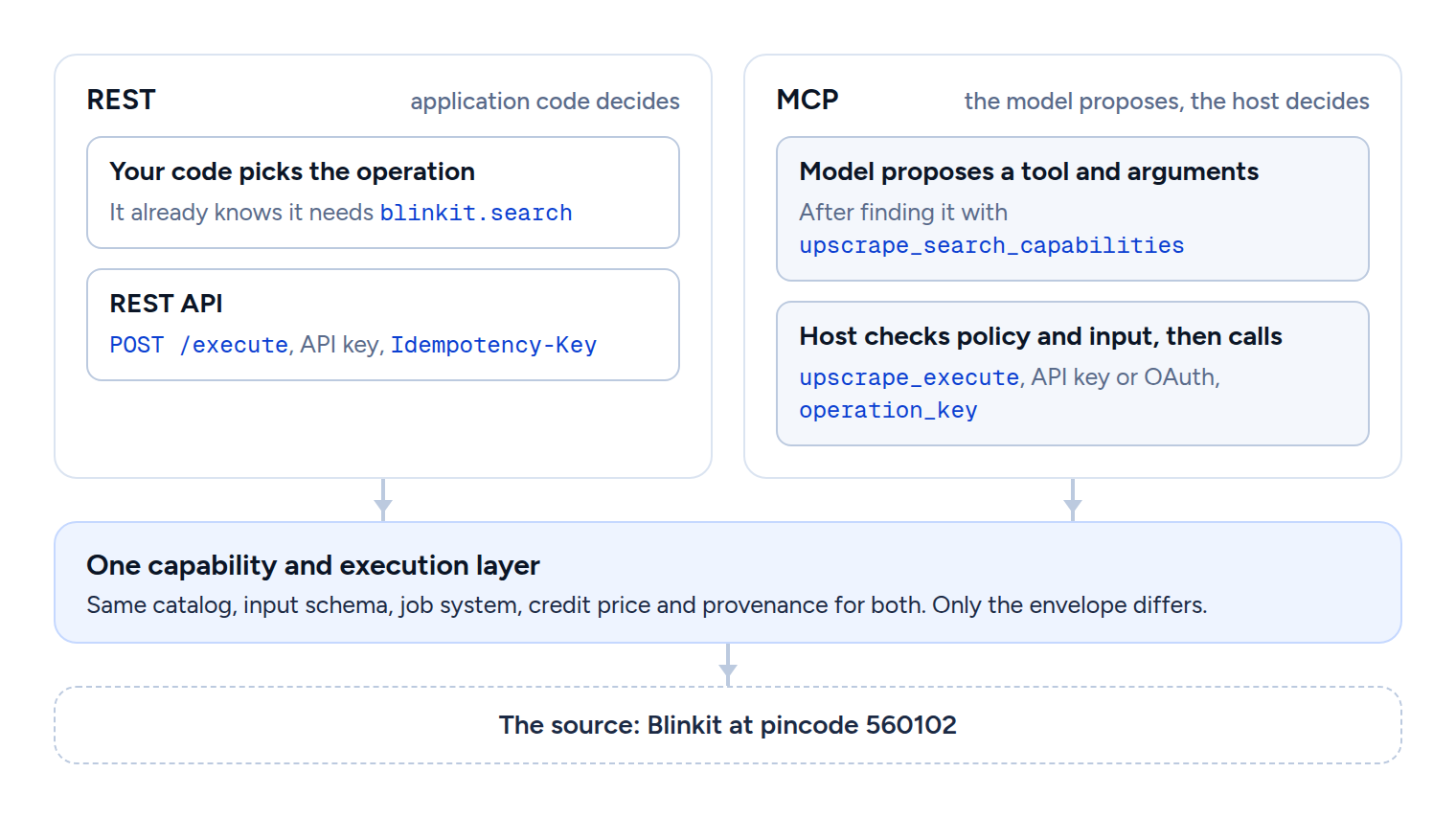
MCP vs API in practice: one search, run both ways
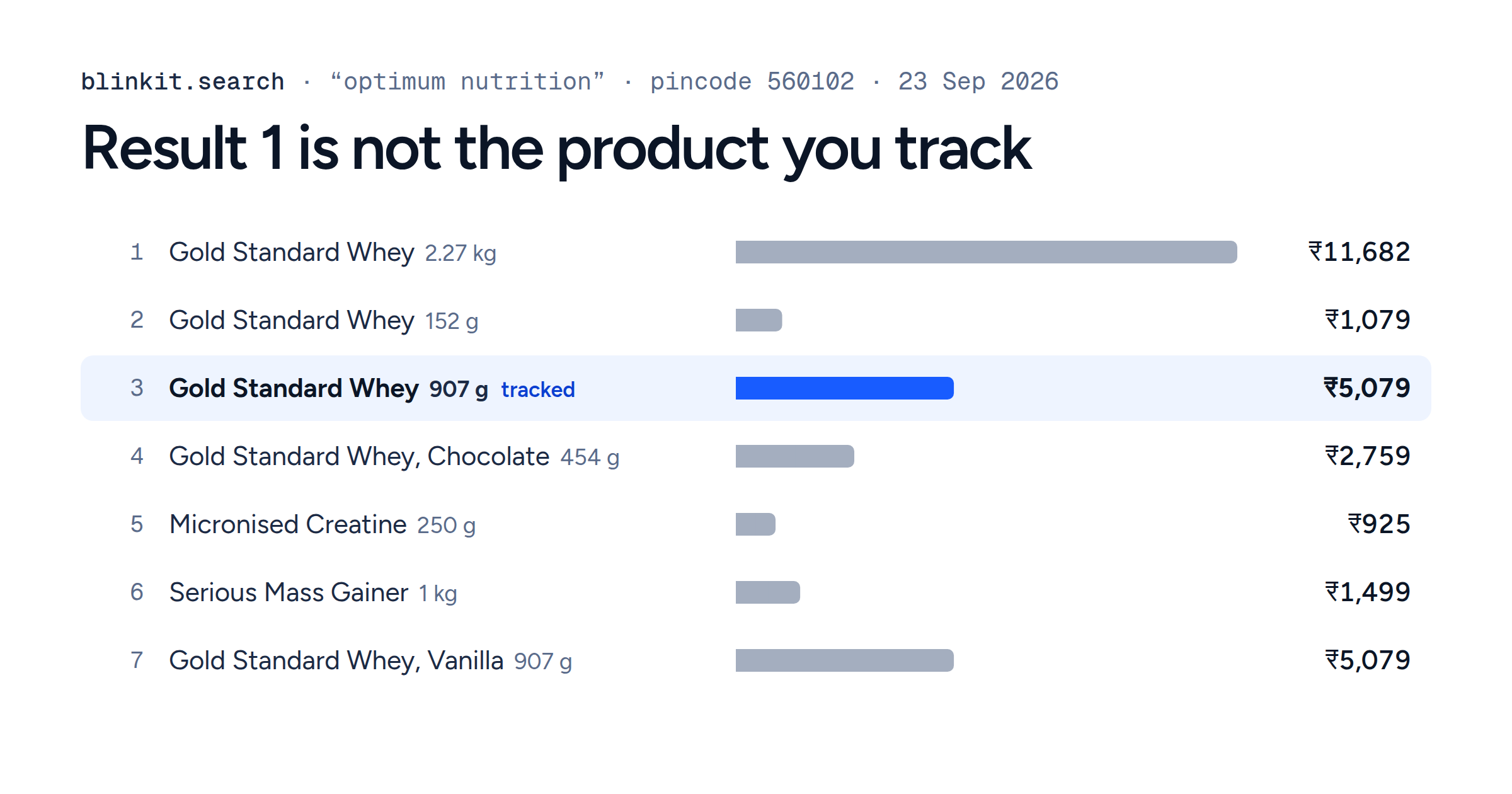
The request asks blinkit.search for "protein bar" at pincode 560102 in Bengaluru, limited to five results.
Over REST, the capability and its input go in the body of POST /execute:
curl --request POST \
  --url https://data.upscrape.com/execute \
  --header "Authorization: Bearer $UPSCRAPE_API_KEY" \
  --header "Content-Type: application/json" \
  --header "Prefer: wait=30" \
  --header "Idempotency-Key: blog-mcp-vs-api-rest-run-20260923" \
  --data '{
    "capability": "blinkit.search",
    "input": {
      "query": "protein bar",
      "pincode": "560102",
      "limit": 5
    }
  }'
Over MCP, the same capability and input become the arguments of the upscrape_execute tool:
{
  "name": "upscrape_execute",
  "arguments": {
    "capability": "blinkit.search",
    "input": {
      "query": "protein bar",
      "pincode": "560102",
      "limit": 5
    },
    "max_credits": 1,
    "operation_key": "blog-mcp-vs-api-mcp-run-20260923"
  }
}
We ran them as two separate jobs, about 20 seconds apart:
| REST | MCP | |
|---|---|---|
Who chose blinkit.search
| Our code, in advance | The agent, after searching the catalog |
| Retry key |
Idempotency-Key header
|
operation_key argument
|
| Job |
49977599-…, completed
|
9950786a-…, completed
|
| Result | 5 products, 2,410 bytes | 5 products, 2,410 bytes |
| SHA-256 of the result |
73dce192…
|
73dce192…, identical
|
| Price | 1 credit (the 1 to 12 product tier) | 1 credit (the same tier) |
| Envelope also carries | job, stats, billing, outcome |
the same, plus collected_at, _provenance, result_complete
|
Both returned the same five products, in the same order, with the same prices, stock and store. At today's pack rates 1 credit costs between $0.00125 and $0.00196, so 1,000 of these searches cost $1.25 to $1.96 either way. The MCP path took one extra step before the call.
The step REST skips: discovery
Upscrape's MCP server has four tools: upscrape_search_capabilities, upscrape_describe_capability, upscrape_execute and upscrape_get_job_result. An agent searches the catalog of capabilities the account can run, reads a capability's inputs if it needs to, and runs it.
The wording of that search changes what the agent finds. Two searches of the live catalog, the same day:
| Catalog search | Matches |
Where blinkit.search came
|
|---|---|---|
| "protein bar prices and stock at an Indian pincode on a grocery delivery app" | 110 | Outside the top 10 |
| "search blinkit products by keyword" | 278 | First |
The plain-language task found five other Blinkit capabilities in its top ten: category listings, product detail, location, delivery times and categories. The specific search put blinkit.search first. A model can get this step wrong, so when your code already knows it needs blinkit.search, call it directly.
Clients that should see particular capabilities as their own tools can use pinned capabilities and larger catalog profiles.
MCP vs function calling
Function calling also lets a model choose. In a function-calling flow, the model returns a structured request, your code runs it, often as a REST call, and passes the result back.
For one application with a few stable tools, that is usually enough. MCP pays off when the same tools have to work in several AI apps, or when there are many tools and the list changes. Hosts can also limit what the model sees: OpenAI's remote MCP support takes an allowed_tools list, for example, so a large server need not fill the prompt.
The three fit together. Function calling is how a model asks for an action, MCP is how a host reaches tool servers, and a REST API can do the work underneath both.
From an agent's question to a scheduled job
An agent helps most with the first, open-ended question: which source covers this pincode, which capability to use, which fields matter. Once someone approves the products, pincodes, schedule and budget, write them into configuration and run them from code over REST. A scheduler has no reason to ask a model to find product search every hour. Our Blinkit price-tracker guide builds that kind of daily job in Python, and an agent can later read the stored results to explain what changed.
MCP handles long jobs as well. Upscrape's MCP job tools return a pending run and fetch it later, and the protocol has an optional Tasks extension. Check what your client supports before you rely on either.
Keep large results out of the model's context
Upscrape's MCP results show a preview of up to 24 KiB and mark anything longer as truncated. The complete stored result can be read in chunks over the same MCP connection.
Filter before the model reads. Anthropic's code execution with MCP example cuts token use from 150,000 to 2,000 by filtering tool results in code first. Our web scraping for AI agents guide measured a 50-product search at 23,346 bytes in full and 222 bytes for the answer.
For recurring data across many products and locations, store the raw results in a database, check and aggregate them in code, and give the model the rows its question needs. Also read a result for what it covers: a search with limit: 5 returns five products, which may be a small part of what the store stocks.
What to check in production
These apply over REST and MCP alike:
Jobs. REST returns 200 when a job finishes within
Prefer: wait=30, or 202 with a job to poll atGET /jobs/{id}. Over MCP,upscrape_get_job_resultdoes the polling. Store the job ID, and poll it after a timeout in your client: the job may still be running.Retries. REST uses the
Idempotency-Keyheader and MCP theoperation_keyargument. A retry with the same key and request reaches the same job, with no second charge. Use a new key for a new observation.Sign-in. REST takes an API key; MCP takes an API key or OAuth.
Access. Pinning tools changes what the model sees, and the generic execute tool still reaches the rest. Control access with key permissions or OAuth scopes.
Untrusted content. Upscrape marks every MCP result as untrusted data. Product text and reviews must never trigger other tool calls, and the MCP specification recommends a person who can deny a tool call.
Fields. The
blinkit.searchreference leaves the platform payload open-ended. Check the fields your application depends on, and record pending, failed, missing and out of stock as four separate states.Speed and cost. Measure the whole path you will run: discovery, model turns, execution and polling.
Where to start
If your application already knows the call, start with the REST quickstart and the Blinkit API. If an agent has to find the call, connect over MCP. Both use one account, one catalog and one price per request, which is how Upscrape is built.